C#使用uiautomator
开发背景#
uiautomator是Android平台上用于UI自动化测试的框架,可模拟用户对设备屏幕的各种操作,如点击、输入、滑动等。
Python中有相对成熟的解决方案,普遍应用于自动化测试中。 项目地址:
uiautomator2
codeskyblue
github.com
然而,近期在C#项目的开发进程中,我始终未能找到合适的解决方案。基于此状况,我计划借鉴该项目,着手打造一个C#版本的项目。
原理研究#
首先先了解一下,该项目实现UIAutomator的原理。

简单来说,其实现原理是:在手机内开启一个rpc服务,然后PC端借助adb forward(adb转发)将该服务在手机中的端口转发至本地。随后,PC端向此服务发送诸如点击、输入之类的请求,手机中的该服务便会执行相应操作来完成这些请求。
尝试一下#
通过以下指令,将U2.jar导入到设备中并启动一个端口固定为9008的服务端
adb push u2.jar /data/local/tmp
adb shell "CLASSPATH=/data/local/tmp/u2.jar app_process / com.wetest.uia2.Main"
通过adb的端口转发功能,随机一个端口与9008形成映射
adb forward tcp:1234 tcp:9008此时python给本地的1234端口发送信息, 设备中的服务端也能同时接收到。
但是,还需要了解发送的是什么信息。通过修改python的uiautomator2源码(如下图所示),打印相关信息。
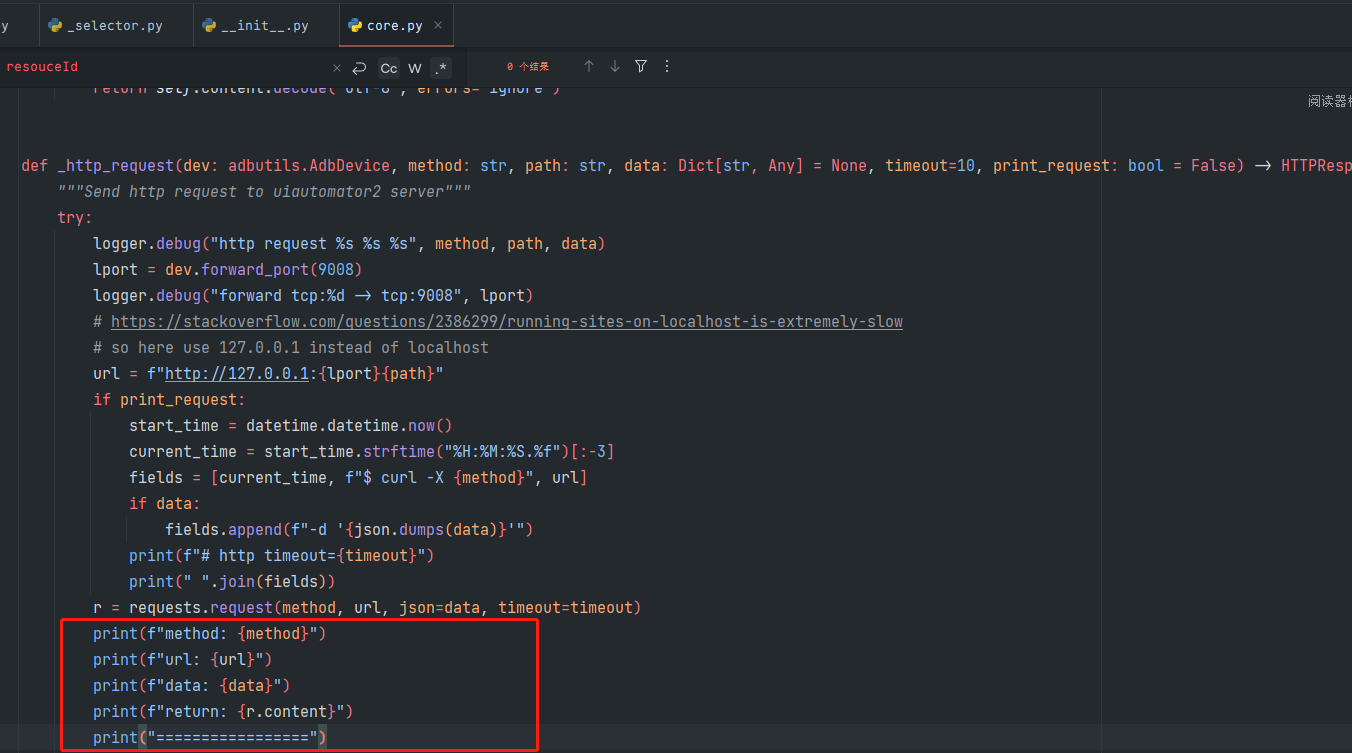
执行下面的代码
import uiautomator2 as u2
d = u2.connect()
d.press("home")
打印出
method: GET
url: http://127.0.0.1:1234/ping
data: None
return: b'pong'
=================
method: POST
url: http://127.0.0.1:1234/jsonrpc/0
data: {'jsonrpc': '2.0', 'id': 1, 'method': 'pressKey', 'params': ('home',)}
return: b'{"jsonrpc":"2.0","id":1,"result":true}\n'
=================
可以推测Get请求只是用来获取服务端的状态,具体的执行是需要发送Post请求的。关键则在于post请求中的data数据。
因此,只要C#也发送相同的请求,理论上也可以实现同样的效果。
代码实现#
/// <summary> 用于启动u2.jar服务并在后台挂载 </summary>
public class MockAdbProcess
{
private static readonly object _lock = new object();
private Process _process;
private string _serial;
public string Serial
{
get { return _serial; }
set { _serial = value; }
}
public MockAdbProcess(string serial)
{
Serial = serial;
StartUiautomatorServer();
AppDomain.CurrentDomain.ProcessExit += OnProcessExit;
}
private void StartUiautomatorServer()
{
StopUiautomatorServer();
string cmd = $"adb -s {Serial} shell \"CLASSPATH=/data/local/tmp/u2.jar app_process / com.wetest.uia2.Main\"";
ProcessStartInfo startInfo = new()
{
FileName = "cmd.exe",
Arguments = $"/c {cmd}",
RedirectStandardOutput = true,
RedirectStandardError = true,
UseShellExecute = false,
CreateNoWindow = true,
WindowStyle = ProcessWindowStyle.Hidden
};
Log.Info($"launch uiautomator with cmd: {cmd}");
_process = new Process { StartInfo = startInfo };
_process.Start();
// 读取错误信息
_process.ErrorDataReceived += (sender, e) =>
{
if(e.Data==null)
if(e.Data != null && e.Data.Contains("UiAutomation not connected"))
{
Log.Error("UiAutomation not connected.");
}
};
_process.BeginErrorReadLine();
}
public void StopUiautomatorServer()
{
string input = NProcess.RunReturnString($"adb -s {Serial} shell ps -A -ef|findstr com.wetest.uia2.Main");
// 定义正则表达式模式来匹配PID
string pattern = @"shell\s+(\d+)";
// 创建Regex对象
Regex regex = new(pattern);
// 查找所有匹配的PID
MatchCollection matches = regex.Matches(input);
// 输出所有匹配的PID
foreach (Match match in matches)
{
string pid = match.Groups[1].Value;
NProcess.RunReturnString($"adb -s {Serial} shell kill -9 {pid}");
Log.Debug($"kill uiautomatorServer pid: {pid}");
}
}
public void Kill()
{
StopUiautomatorServer();
if (_process != null && !_process.HasExited)
{
try
{
_process.Kill();
_process.WaitForExit();
Log.Info("Process has been killed and exited.");
}
catch (Exception ex)
{
Log.Error($"Failed to kill the process: {ex.Message}");
}
}
}
private void OnProcessExit(object sender, EventArgs e)
{
Kill();
}
public void Dispose()
{
Kill();
}
}
public class U2Device
{
private MockAdbProcess _process;
private string _serial = string.Empty;
private ADB _adb;
private static readonly SemaphoreSlim _semaphore = new(1, 1); // 创建一个 SemaphoreSlim,最大并发数为 1
private string urlBase = "http://127.0.0.1";
public string Serial
{
get { return _serial; }
set { _serial = value; }
}
/// <summary>
/// 构造方法。
/// </summary>
/// <param name="serial">设备的序列号。如果未指定,则使用第一个连接的设备。</param>
public U2Device(string serial = "")
{
if (string.IsNullOrEmpty(serial))
{
List<string> devices = ADB.Devices();
if (devices.Count > 0)
{
Serial = devices[0]; // 如果有设备连接,则使用第一个设备
}
else
{
throw new InvalidOperationException("no devices/emulators found");
}
}
else
{
Serial = serial;
}
_adb = new ADB(Serial);
string port = _adb.GetForwardPort();
urlBase = $"http://127.0.0.1:{port}";
}
/// <summary>
/// 安装U2工具的JAR文件。如果指定了重新安装,则先删除现有的JAR文件,然后检查并推送新的JAR文件到指定目录。
/// </summary>
/// <param name="reinstall">是否重新安装U2工具的JAR文件,默认为false。</param>
public void SetupJar(bool reinstall=false)
{
if (reinstall)
{
_adb.FileRemove("/data/local/tmp/u2.jar");
}
if (!_adb.FileExists("/data/local/tmp/u2.jar"))
{
_adb.Push("Assets/u2/u2.jar", "/data/local/tmp");
}
}
/// <summary>
/// 检查U2设备是否在线(响应"pong")。
/// </summary>
/// <returns>如果设备在线并响应"pong",则返回true;否则返回false。</returns>
public bool Live()
{
string r = Requests.Get($"{urlBase}/ping").Result;
return Equals(r, "pong");
}
/// <summary>
/// 等待U2服务在线,直到超时。
/// </summary>
/// <param name="timeout">等待的超时时间(秒),默认为30秒。</param>
/// <returns>如果在超时时间内U2服务在线,则返回true;否则返回false。</returns>
public bool Wait(int timeout=30)
{
DateTime startTime = DateTime.Now;
while (DateTime.Now - startTime < TimeSpan.FromSeconds(timeout))
{
if (Live())
return true;
}
return false;
}
/// <summary>
/// 启动设备的U2服务,并等待服务在线。
/// </summary>
public void LaunchUiautomator()
{
_process = new(Serial);
string port = _adb.GetForwardPort();
urlBase = $"http://127.0.0.1:{port}";
Wait();
}
/// <summary>
/// 启动设备的U2服务。如果服务已经在运行,则直接返回;否则,安装U2并启动服务。
/// </summary>
public void StartUiautomator()
{
// 检查u2服务是否正在运行
if (Live())
{
return;
}
// 安装u2
if (!_adb.FileExists("/data/local/tmp/u2.jar"))
{
SetupJar();
}
// 启动u2服务
LaunchUiautomator();
}
/// <summary>
/// 停止设备的U2服务。
/// </summary>
public void StopUiautomator()
{
_process?.Kill();
}
/// <summary>
/// 在设备上执行Shell命令。
/// </summary>
/// <param name="cmd">要在设备上执行的Shell命令。</param>
/// <returns>返回命令执行的结果字符串。</returns>
public string Shell(string cmd)
{
return _adb.Shell(cmd);
}
/// <summary>
/// 在设备上模拟按键操作。
/// </summary>
/// <param name="keyCode">要模拟的按键。</param>
public void Press(KeyCode keyCode)
{
// 字典映射 KeyCode 到按键字符串
var keyMapping = new Dictionary<KeyCode, string>
{
{ KeyCode.Home, "home" },
{ KeyCode.Back, "back" },
{ KeyCode.Left, "left" },
{ KeyCode.Right, "right" },
{ KeyCode.Up, "up" },
{ KeyCode.Down, "down" },
{ KeyCode.Center, "center" },
{ KeyCode.Menu, "menu" },
{ KeyCode.Search, "search" },
{ KeyCode.Enter, "enter" },
{ KeyCode.Delete, "delete" },
{ KeyCode.Recent, "recent" },
{ KeyCode.VolumeUp, "volume_up" },
{ KeyCode.VolumeDown, "volume_down" },
{ KeyCode.VolumeMute, "volume_mute" },
{ KeyCode.Camera, "camera" },
{ KeyCode.Power, "power" }
};
// 检查是否存在于映射中
if (keyMapping.TryGetValue(keyCode, out string keyString))
{
JsonRpcCall("pressKey", [keyString]);
}
else
{
// 错误处理:当传入的 KeyCode 不在映射中时
throw new ArgumentOutOfRangeException(nameof(keyCode), "Invalid KeyCode value");
}
}
/// <summary>
/// 在设备上模拟长按按键操作。
/// </summary>
/// <param name="keyCode">要模拟长按的按键。</param>
public void LongPress(KeyCode keyCode)
{
// 使用字典映射 KeyCode 到对应的 keyevent 数值
var keyEventMapping = new Dictionary<KeyCode, int>
{
{ KeyCode.Home, 3 },
{ KeyCode.Back, 4 },
{ KeyCode.Left, 21 },
{ KeyCode.Right, 22 },
{ KeyCode.Up, 19 },
{ KeyCode.Down, 20 },
{ KeyCode.Center, 23 },
{ KeyCode.Menu, 82 },
{ KeyCode.Search, 84 },
{ KeyCode.Enter, 66 },
{ KeyCode.Delete, 67 },
{ KeyCode.Notification, 83 },
{ KeyCode.VolumeUp, 24 },
{ KeyCode.VolumeDown, 25 },
{ KeyCode.VolumeMute, 91 },
{ KeyCode.Power, 26 }
};
// 如果映射中不存在该按键,抛出异常
if (!keyEventMapping.TryGetValue(keyCode, out int code))
{
throw new ArgumentOutOfRangeException(nameof(keyCode), "Invalid KeyCode value");
}
// 执行 shell 命令
Shell($"input keyevent --longpress {code}");
}
/// <summary>
/// 在设备上模拟点击操作。
/// </summary>
/// <param name="x">点击位置的X坐标。</param>
/// <param name="y">点击位置的Y坐标。</param>
public void Click(double x, double y)
{
JsonRpcCall("click", [x, y]);
}
/// <summary>
/// 在设备上模拟长按操作。
/// </summary>
/// <param name="x">长按位置的X坐标。</param>
/// <param name="y">长按位置的Y坐标。</param>
/// <param name="duration">长按的持续时间(秒),默认为0.5秒。</param>
public void LongClick(double x, double y, double duration = 0.5)
{
JsonRpcCall("click", [x, y, duration*1000]);
}
/// <summary>
/// 在设备上模拟滑动操作。
/// </summary>
/// <param name="x1">起始点的X坐标。</param>
/// <param name="y1">起始点的Y坐标。</param>
/// <param name="x2">终点X坐标。</param>
/// <param name="y2">终点Y坐标。</param>
/// <param name="duration">滑动操作的持续时间,默认为0。</param>
/// <param name="steps">滑动操作的步数,默认为55。</param>
public void Swipe(double x1, double y1, double x2, double y2, double duration=0, int steps=55)
{
if (duration != 0 && steps != 0)
duration = 0; // duration与steps不能同时设置.
if (duration != 0)
{
steps = (int)(duration * 200);
}
_adb.Rel2Abs(x1, y1, out double abs_x1, out double abs_y1);
_adb.Rel2Abs(x2, y2, out double abs_x2, out double abs_y2);
JsonRpcCall("swipe", [abs_x1, abs_y1, abs_x2, abs_y2, steps]);
}
/// <summary>
/// 在设备上模拟拖拽操作。
/// </summary>
/// <param name="x1">起始点的X坐标。</param>
/// <param name="y1">起始点的Y坐标。</param>
/// <param name="x2">终点X坐标。</param>
/// <param name="y2">终点Y坐标。</param>
/// <param name="duration">滑动操作的持续时间,默认为0.5。</param>
public void Drag(double x1, double y1, double x2, double y2, double duration = 0.5)
{
_adb.Rel2Abs(x1, y1, out double abs_x1, out double abs_y1);
_adb.Rel2Abs(x2, y2, out double abs_x2, out double abs_y2);
JsonRpcCall("drag", [abs_x1, abs_y1, abs_x2, abs_y2, duration*200]);
}
/// <summary> 唤醒屏幕 </summary>
public void ScreenOn()
{
JsonRpcCall("wakeUp", []);
}
/// <summary> 熄灭屏幕 </summary>
public void ScreenOff()
{
JsonRpcCall("sleep", []);
}
/// <summary>
/// 获取屏幕旋转方向
/// </summary>
/// <return>屏幕旋转方向的枚举值 </return>
public Orientation GetOrientation()
{
// 获取设备信息
string r = JsonRpcCall("deviceInfo", []);
// 使用正则表达式提取 displayRotation 值
string pattern = @"""displayRotation"":(\d)";
Regex regex = new(pattern);
Match match = regex.Match(r);
// 如果匹配成功,解析 orientation,否则返回默认值
if (match.Success)
{
string orientation = match.Groups[1].Value;
// 映射数字到对应的枚举值
return orientation switch
{
"0" => Orientation.Natural,
"1" => Orientation.Left,
"2" => Orientation.Upsidedown,
"3" => Orientation.Right,
_ => Orientation.Natural, // 如果值不符合预期,则返回默认值
};
}
// 如果没有匹配到,则返回默认值
return Orientation.Natural;
}
/// <summary>
/// 设置屏幕旋转方向
/// </summary>
/// <param name="orientation">屏幕旋转方向的枚举值。</param>
public void SetOrientation(Orientation orientation)
{
var keyMapping = new Dictionary<Orientation, string>
{
{ Orientation.Natural, "natural" },
{ Orientation.Left, "left" },
{ Orientation.Upsidedown, "upsidedown" },
{ Orientation.Right, "right" },
};
// 检查是否存在于映射中
if (keyMapping.TryGetValue(orientation, out string keyString))
{
// 调用 JsonRpcCall
JsonRpcCall("setOrientation", [keyString]);
}
else
{
// 错误处理:当传入的 KeyCode 不在映射中时
throw new ArgumentOutOfRangeException(nameof(orientation), "Invalid KeyCode value");
}
}
/// <summary> 打开通知栏 </summary>
public void OpenNotification()
{
JsonRpcCall("openNotification", []);
}
/// <summary> 打开快速设置</summary>
public void OpenQuickSettings()
{
JsonRpcCall("openQuickSettings", []);
}
/// <summary> 清空文本 </summary>
public void ClearInputText()
{
JsonRpcCall("clearInputText", []);
JsonRpcCall("clearInputText", []); // 执行两次 概率性无法清空
}
/// <summary>
/// 输入文本
/// </summary>
/// <param name="text">文本内容。</param>
/// <param name="clear">是否清空原文本,默认false。</param>
public void InputText(string text, bool clear=false)
{
if (clear)
{
ClearInputText();
Sleep(500);
}
Shell($"input text {text}");
}
/// <summary>
/// 获取属性值
/// </summary>
/// <param name="prop">需要获取的属性。</param>
public string Getprop(string prop)
{
return Shell($"getprop {prop}");
}
/// <summary>
/// 等待控件出现
/// </summary>
/// <param name="selector"> 选择器 </param>
/// <param name="timeout"> 等待超时时间,默认20000ms </param>
public void WaitForExists(Selector selector, int timeout= 20000)
{
JsonRpcCall("waitForExists", [selector.Contents, timeout]);
}
/// <summary>
/// 判断控件是否存在
/// </summary>
/// <param name="selector"> 选择器 </param>
/// <return> 控件是否存在 </return>
public bool Exists(Selector selector)
{
string r = JsonRpcCall("exist", [selector.Contents]);
return r.Contains("true");
}
/// <summary>
/// 获取控件信息
/// </summary>
/// <param name="selector"> 选择器 </param>
/// <return> 控件信息 </return>
public Dictionary<string, object> ObjInfo(Selector selector)
{
string r = JsonRpcCall("objInfo", [selector.Contents]);
var jsonObject = JObject.Parse(r);
// 提取 "result" 部分
var result = jsonObject["result"];
// 将 "result" 部分转换为字典
var resultDictionary = result.ToObject<Dictionary<string, object>>();
// 处理 bounds,拆分成各个子字段并添加到字典中
if (resultDictionary.ContainsKey("bounds"))
{
// 拆分 "bounds" 中的字段并添加到字典
if (resultDictionary["bounds"] is JObject bounds)
{
resultDictionary["boundsBottom"] = bounds["bottom"];
resultDictionary["boundsLeft"] = bounds["left"];
resultDictionary["boundsRight"] = bounds["right"];
resultDictionary["boundsTop"] = bounds["top"];
resultDictionary.Remove("bounds");
}
}
if (resultDictionary.ContainsKey("visibleBounds"))
{
if (resultDictionary["visibleBounds"] is JObject visibleBounds)
{
resultDictionary["visibleBoundsBottom"] = visibleBounds["bottom"];
resultDictionary["visibleBoundsLeft"] = visibleBounds["left"];
resultDictionary["visibleBoundsRight"] = visibleBounds["right"];
resultDictionary["visibleBoundsTop"] = visibleBounds["top"];
resultDictionary.Remove("visibleBounds");
}
}
return resultDictionary;
}
/// <summary>
/// 点击控件
/// </summary>
/// <param name="selector"> 选择器 </param>
/// <param name="delay"> 执行结束后等待时间,默认2秒 </param>
public void ClickUi(Selector selector, int delay=2000)
{
WaitForExists(selector);
Dictionary<string, object> objInfo = ObjInfo(selector);
double center_x = (Convert.ToInt32(objInfo["boundsLeft"]) + Convert.ToInt32(objInfo["boundsRight"])) / 2;
double center_y = (Convert.ToInt32(objInfo["boundsTop"]) + Convert.ToInt32(objInfo["boundsBottom"])) / 2;
Click(center_x, center_y);
Sleep(delay);
}
/// <summary>
/// 查找控件
/// </summary>
/// <param name="selector"> 选择器 </param>
/// <param name="isClick"> 是否点击 </param>
/// <param name="delay"> 执行结束后等待时间,默认2秒 </param>
/// <returns> 是否存在 </returns>
public bool FindUi(Selector selector, bool isClick = false, int delay = 2000)
{
bool isExist = Exists(selector);
if (isExist && isClick)
{
ClickUi(selector, delay);
}
return isExist;
}
public static void Sleep(int sleepTime)
{
Thread.Sleep(sleepTime);
}
public static Selector By(string text = "", string textContains = "", string textMatches = "", string textStartsWith = "", string className = "",
string classNameMatches = "", string description = "", string descriptionContains = "", string descriptionMatches = "", string descriptionStartsWith = "",
string checkable = "", string Checked = "", string clickable = "", string longClickable = "", string scrollable = "", string enabled = "", string focusable = "",
string focused = "", string selected = "", string packageName = "", string packageNameMatches = "", string resourceId = "", string resourceIdMatches = "",
string index = "")
{
Selector selector = new();
int mask = 0;
if (!string.IsNullOrEmpty(text))
{
selector.Contents.Add("text", text);
mask |= 1 << 0; // 0x01
}
if (!string.IsNullOrEmpty(textContains))
{
selector.Contents.Add("textContains", textContains);
mask |= 1 << 1; // 0x02
}
if (!string.IsNullOrEmpty(textMatches))
{
selector.Contents.Add("textMatches", textMatches);
mask |= 1 << 2; // 0x04
}
if (!string.IsNullOrEmpty(textStartsWith))
{
selector.Contents.Add("textStartsWith", textStartsWith);
mask |= 1 << 3; // 0x08
}
if (!string.IsNullOrEmpty(className))
{
selector.Contents.Add("className", className);
mask |= 1 << 4; // 0x10
}
if (!string.IsNullOrEmpty(classNameMatches))
{
selector.Contents.Add("classNameMatches", classNameMatches);
mask |= 1 << 5; // 0x20
}
if (!string.IsNullOrEmpty(description))
{
selector.Contents.Add("description", description);
mask |= 1 << 6; // 0x40
}
if (!string.IsNullOrEmpty(descriptionContains))
{
selector.Contents.Add("descriptionContains", descriptionContains);
mask |= 1 << 7; // 0x80
}
if (!string.IsNullOrEmpty(descriptionMatches))
{
selector.Contents.Add("descriptionMatches", descriptionMatches);
mask |= 1 << 8; // 0x0100
}
if (!string.IsNullOrEmpty(descriptionStartsWith))
{
selector.Contents.Add("descriptionStartsWith", descriptionStartsWith);
mask |= 1 << 9; // 0x0200
}
if (!string.IsNullOrEmpty(checkable))
{
selector.Contents.Add("checkable", checkable);
mask |= 1 << 10; // 0x0400
}
if (!string.IsNullOrEmpty(Checked))
{
selector.Contents.Add("checked", Checked);
mask |= 1 << 11; // 0x0800
}
if (!string.IsNullOrEmpty(clickable))
{
selector.Contents.Add("clickable", clickable);
mask |= 1 << 12; // 0x1000
}
if (!string.IsNullOrEmpty(longClickable))
{
selector.Contents.Add("longClickable", longClickable);
mask |= 1 << 13; // 0x2000
}
if (!string.IsNullOrEmpty(scrollable))
{
selector.Contents.Add("scrollable", scrollable);
mask |= 1 << 14; // 0x4000
}
if (!string.IsNullOrEmpty(enabled))
{
selector.Contents.Add("enabled", enabled);
mask |= 1 << 15; // 0x8000
}
if (!string.IsNullOrEmpty(focusable))
{
selector.Contents.Add("focusable", focusable);
mask |= 1 << 16; // 0x010000
}
if (!string.IsNullOrEmpty(focused))
{
selector.Contents.Add("focused", focused);
mask |= 1 << 17; // 0x020000
}
if (!string.IsNullOrEmpty(selected))
{
selector.Contents.Add("selected", selected);
mask |= 1 << 18; // 0x040000
}
if (!string.IsNullOrEmpty(packageName))
{
selector.Contents.Add("packageName", packageName);
mask |= 1 << 19; // 0x080000
}
if (!string.IsNullOrEmpty(packageNameMatches))
{
selector.Contents.Add("packageNameMatches", packageNameMatches);
mask |= 1 << 20; // 0x100000
}
if (!string.IsNullOrEmpty(resourceId))
{
selector.Contents.Add("resourceId", resourceId);
mask |= 1 << 21; // 0x200000
}
if (!string.IsNullOrEmpty(resourceIdMatches))
{
selector.Contents.Add("resourceIdMatches", resourceIdMatches);
mask |= 1 << 22; // 0x400000
}
if (!string.IsNullOrEmpty(index))
{
selector.Contents.Add("index", index);
mask |= 1 << 23; // 0x800000
}
selector.Contents.Add("mask", mask);
selector.Mask = mask;
return selector;
}
public string JsonRpcCall(string method, object[] param, int timeout = 60)
{
// 等待获取信号量,保证只有一个线程可以进入下面的异步调用
_semaphore.WaitAsync();
string r = String.Empty;
try
{
if (!Live())
{
Log.Debug($"uiautomator2 no ok");
StopUiautomator();
StartUiautomator();
}
r = _JsonRpcCall(method, param, timeout);
//Log.Info(r);
if (r.Contains("An error occurred while sending the request") || r.Contains("无法连接"))
{
Log.Debug($"uiautomator2 no ok");
StopUiautomator();
StartUiautomator();
_JsonRpcCall(method, param, timeout);
}
else if (r.Contains("UiObjectNotFound"))
{
Log.Error(r);
throw new UiObjectNotFoundError(r);
} else if (r.Contains("IllegalStateException"))
{
Log.Error(r);
throw new IllegalStateException(r);
}
}
catch (Exception ex)
{
Log.Error($"JsonRpcCall error: {ex.Message}");
throw;
}
finally
{
// 确保释放信号量,允许其他线程继续执行
_semaphore.Release();
}
return r;
}
public string _JsonRpcCall(string method, object[] param, int timeout = 60)
{
// 使用字典创建 JSON-RPC 2.0 请求数据
var content = new Dictionary<string, object>
{
{ "jsonrpc", "2.0" },
{ "id", 1 },
{ "method", method },
{ "params", param } // params 使用对象数组
};
//Log.Debug($"method: {method}, params: {FormatParameters(param)}, timeout: {timeout}");
return Requests.Post($"{urlBase}/jsonrpc/0", JsonConvert.SerializeObject(content), timeout);
}
private string FormatParameters(object[] param)
{
if (param == null || param.Length == 0)
{
return "empty";
}
return string.Join(", ", param.Select(p => FormatObject(p)));
}
private string FormatObject(object obj)
{
if (obj == null)
{
return "null";
}
// 如果是字典类型,递归格式化字典内容
if (obj is Dictionary<string, object> dict)
{
return "{" + string.Join(", ", dict.Select(kv => $"{kv.Key}: {FormatObject(kv.Value)}")) + "}";
}
// 如果是列表类型(例如 List<object>),递归格式化列表元素
if (obj is IEnumerable<object> enumerable)
{
return "[" + string.Join(", ", enumerable.Select(e => FormatObject(e))) + "]";
}
// 如果是DateTime类型,返回自定义格式的日期
if (obj is DateTime)
{
return ((DateTime)obj).ToString("yyyy-MM-dd HH:mm:ss");
}
// 默认返回对象的 ToString() 值
return obj.ToString();
}
}提示
目前只实现了部分常用的功能
C

ATao
原创C#使用uiautomator
分享
本博客所有文章除特别声明外,均采用 CC BY-NC-SA 4.0 许可协议, 转载请注明出处。