minecraft模组:02创建工具
前言#
基于minecraft1.21版本
通过fabric编写模组,创建一套自定义工具[铜镐,铜锄,铜锹,铜斧,铜剑]
工具材质#
在 Minecraft 开发中,ToolMaterials 类是一个非常重要的类,它主要用于定义工具的材质属性。
首先,创建一个铜质的工具材料,统一管理耐久度,挖掘速度,攻击力,附魔能力等。
/**
 * 自定义的铜质工具材料类,实现了 ToolMaterial 接口,用于定义铜质工具的各项属性。
 */
public class CopperToolMaterial implements ToolMaterial {

    public static final CopperToolMaterial INSTANCE = new CopperToolMaterial();

    private final Supplier<Ingredient> repairIngredient = () ->
            Ingredient.ofItems(Items.COPPER_INGOT);

    // 耐久度  木制59/石制131/铁制250/金制32/钻石1561/下界合金2031
    @Override
    public int getDurability() { return 200; }

    // 挖掘速度乘数 木制2.0/石制4.0/铁制6.0/金制12.0/钻石8.0/下界合金9.0
    @Override
    public float getMiningSpeedMultiplier() {
        return 5.0f;
    }

    // 攻击伤害 木制0.0/石制1.0/铁制2.0/金制0.0/钻石4.0/下界合金4.0
    @Override
    public float getAttackDamage() {
        return 1.5f;
    }

    @Override
    public TagKey<Block> getInverseTag() {
        return BlockTags.INCORRECT_FOR_STONE_TOOL;
    }

    // 附魔能力 木制15/石制5/铁制14/金制22/钻石10/下界合金15
    @Override
    public int getEnchantability() {
        return 10;
    }

    @Override
    public Ingredient getRepairIngredient() {
        return repairIngredient.get();
    }

    // 静态方法,用于注册物品到游戏的物品注册表中
    public static Item register(Item item, String id) {
        // 创建物品的标识符
        Identifier itemID = Identifier.of("mymod", id);
        // 将物品注册到游戏的物品注册表中,并返回注册后的物品实例
        return Registry.register(Registries.ITEM, itemID, item);
    }
}注册物品#
通过register方法进行注册。分别将铜镐、铜锄、铜锹、铜斧和铜剑的攻击伤害和攻击速度修改为[3.5, 1, 4, 9, 5.5]与[1.2, 2, 1, 0.8, 1.6]
public class CopperPickaxe {
    // 创建一个日志记录器
    public static final Logger LOGGER = LoggerFactory.getLogger("MyMod");

    // 定义一个静态的铜镐物品实例, 并通过 register 方法将该物品注册到游戏中
    public static final Item copperPickaxe = CopperToolMaterial.register(
            new PickaxeItem(CopperToolMaterial.INSTANCE,
                    new Item.Settings().attributeModifiers(PickaxeItem.createAttributeModifiers(CopperToolMaterial.INSTANCE, 1, -2.8f))),
            "copper_pickaxe"
    );

    // 初始化
    public static void initialize() {
        ItemGroupEvents.modifyEntriesEvent(ItemGroups.TOOLS)
                .register((itemGroup) -> itemGroup.add(copperPickaxe));
        LOGGER.info("[DEBUG] 铜镐注册完成");
    }
}

// 铜锄
public class CopperHoe {
    // 创建一个日志记录器
    public static final Logger LOGGER = LoggerFactory.getLogger("MyMod");

    // 定义一个静态的铜锄物品实例, 并通过 register 方法将该物品注册到游戏中
    public static final Item CopperHoe = CopperToolMaterial.register(
            new HoeItem(CopperToolMaterial.INSTANCE,
                    new Item.Settings().attributeModifiers(HoeItem.createAttributeModifiers(CopperToolMaterial.INSTANCE, -1.5f, -2))),
            "copper_hoe"
    );

    // 初始化
    public static void initialize() {
        ItemGroupEvents.modifyEntriesEvent(ItemGroups.TOOLS)
                .register((itemGroup) -> itemGroup.add(CopperHoe));

        LOGGER.info("[DEBUG] 铜锄注册完成");
    }
}

// 铜锹
public class CopperShovel {
    // 创建一个日志记录器
    public static final Logger LOGGER = LoggerFactory.getLogger("MyMod");

    // 定义一个静态的铜锹物品实例, 并通过 register 方法将该物品注册到游戏中
    public static final Item CopperShovel = CopperToolMaterial.register(
            new ShovelItem(CopperToolMaterial.INSTANCE,
                    new Item.Settings().attributeModifiers(ShovelItem.createAttributeModifiers(CopperToolMaterial.INSTANCE, 1.5f, -3))),
            "copper_shovel"
    );

    // 初始化
    public static void initialize() {
        ItemGroupEvents.modifyEntriesEvent(ItemGroups.TOOLS)
                .register((itemGroup) -> itemGroup.add(CopperShovel));

        LOGGER.info("[DEBUG] 铜锹注册完成");
    }
}

// 铜斧
public class CopperAxe {
    // 创建一个日志记录器
    public static final Logger LOGGER = LoggerFactory.getLogger("MyMod");

    // 定义一个静态的铜斧物品实例, 并通过 register 方法将该物品注册到游戏中
    public static final Item CopperAxe = CopperToolMaterial.register(
            new AxeItem(CopperToolMaterial.INSTANCE,
                    new Item.Settings().attributeModifiers(AxeItem.createAttributeModifiers(CopperToolMaterial.INSTANCE, 6.5f, -3.2f))),
            "copper_axe"
    );

    // 初始化
    public static void initialize() {
        ItemGroupEvents.modifyEntriesEvent(ItemGroups.TOOLS)
                .register((itemGroup) -> itemGroup.add(CopperAxe));

        LOGGER.info("[DEBUG] 铜斧注册完成");
    }
}

// 铜剑
public class CopperSword {
    // 创建一个日志记录器
    public static final Logger LOGGER = LoggerFactory.getLogger("MyMod");

    // 定义一个静态的铜剑物品实例, 并通过 register 方法将该物品注册到游戏中
    public static final Item copperSword = CopperToolMaterial.register(
            new SwordItem(CopperToolMaterial.INSTANCE,
                    new Item.Settings().attributeModifiers(SwordItem.createAttributeModifiers(CopperToolMaterial.INSTANCE, 3, -2.4f))),
            "copper_sword"
    );

    // 初始化
    public static void initialize() {
        ItemGroupEvents.modifyEntriesEvent(ItemGroups.COMBAT)
                .register((itemGroup) -> itemGroup.add(copperSword));
        LOGGER.info("[DEBUG] 铜剑注册完成");
    }
}
添加翻译#
en_us#
打开main\resources\assets\mymod\lang\en_us.json文件,不存在则新建,添加英语翻译
{
  "item.mymod.copper_pickaxe": "Copper Pickaxe",
  "item.mymod.copper_axe": "Copper Axe",
  "item.mymod.copper_hoe": "Copper Hoe",
  "item.mymod.copper_shovel": "Copper Shovel",
  "item.mymod.copper_sword": "Copper Sword",
}zh_ch#
打开main\resources\assets\mymod\lang\zh_ch.json文件,不存在则新建,添加中文翻译
{
  "item.mymod.copper_pickaxe": "铜镐",
  "item.mymod.copper_axe": "铜斧",
  "item.mymod.copper_hoe": "铜锄",
  "item.mymod.copper_shovel": "铜锹",
  "item.mymod.copper_sword": "铜剑",
}添加纹理模型#
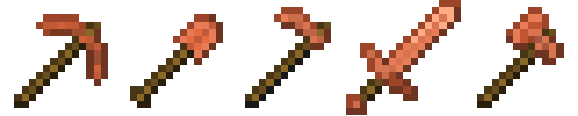
在main\resources\assets\mymod\models\item文件夹下,新建copper_axe.json,copper_hoe.json,copper_pickaxe.json, copper_shovel.json,copper_sword.json等文件,写入对应模型文件。
// copper_axe.json
{
  "parent": "item/handheld",
  "textures": {
    "layer0": "mymod:item/copper_axe",
  },
}
// copper_hoe.json
{
"parent": "item/handheld",
"textures": {
"layer0": "mymod:item/copper_hoe",
},
}// copper_pickaxe.json
{
"parent": "item/handheld",
"textures": {
"layer0": "mymod:item/copper_pickaxe",
},
}// copper_shovel.json
{
"parent": "item/handheld",
"textures": {
"layer0": "mymod:item/copper_shovel",
},
}// copper_sword.json
{
"parent": "item/handheld",
"textures": {
"layer0": "mymod:item/copper_sword",
},
}需要注意的是,此时parent填入的是item/handheld模型,表示物品将使用默认的手持物品显示方式。
在main\resources\assets\mymod\textures\item文件夹下,放入对应纹理文件。
合成#
以上的代码已经可以在游戏里正常工作了,但是想要在生存模式中使用,就需要设计对应的合成方式。
在main\resources\data\mymod\recipe文件夹下,分别新建对应工具的json文件,写入合成方式。
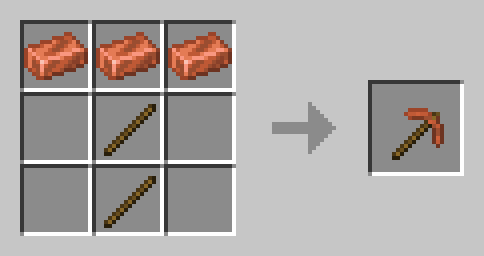
- 铜镐
// copper_pickaxe.json
{
  "type": "minecraft:crafting_shaped",
  "pattern": [
    "ccc",
    " / ",
    " / ",
  ],
  "key": {
    "c": {
      "item": "minecraft:copper_ingot",
    },
    "/": {
      "item": "minecraft:stick",
    },
  },
  "result": {
    "id": "mymod:copper_pickaxe",
    "count": 1,
  },
}
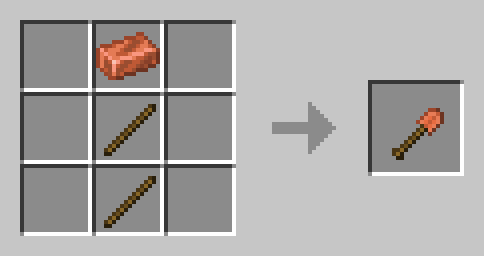
- 铜铲
// copper_shovel.json
{
  "type": "minecraft:crafting_shaped",
  "pattern": [
    " c ",
    " / ",
    " / ",
  ],
  "key": {
    "c": {
      "item": "minecraft:copper_ingot",
    },
    "/": {
      "item": "minecraft:stick",
    },
  },
  "result": {
    "id": "mymod:copper_shovel",
    "count": 1,
  },
}
- 铜锄
// copper_hoe.json
{
  "type": "minecraft:crafting_shaped",
  "pattern": [
    "cc ",
    " / ",
    " / ",
  ],
  "key": {
    "c": {
      "item": "minecraft:copper_ingot",
    },
    "/": {
      "item": "minecraft:stick",
    },
  },
  "result": {
    "id": "mymod:copper_hoe",
    "count": 1,
  },
}
// copper_hoe2.json
{
"type": "minecraft:crafting_shaped",
"pattern": [
" cc",
" / ",
" / ",
],
"key": {
"c": {
"item": "minecraft:copper_ingot",
},
"/": {
"item": "minecraft:stick",
},
},
"result": {
"id": "mymod:copper_hoe",
"count": 1,
},
}
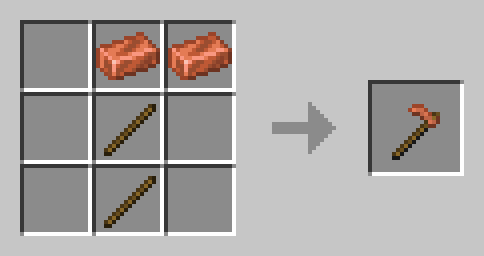
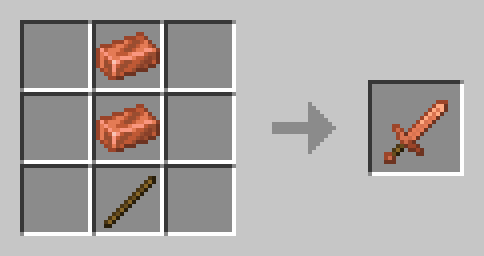
- 铜剑
// copper_sword.json
{
  "type": "minecraft:crafting_shaped",
  "pattern": [
    " c ",
    " c ",
    " / ",
  ],
  "key": {
    "c": {
      "item": "minecraft:copper_ingot",
    },
    "/": {
      "item": "minecraft:stick",
    },
  },
  "result": {
    "id": "mymod:copper_sword",
    "count": 1,
  },
}
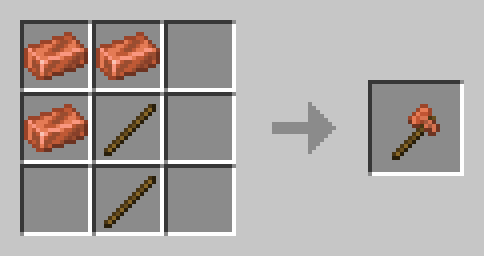
- 铜斧
// copper_axe.json
{
  "type": "minecraft:crafting_shaped",
  "pattern": [
    "cc ",
    "c/ ",
    " / ",
  ],
  "key": {
    "c": {
      "item": "minecraft:copper_ingot",
    },
    "/": {
      "item": "minecraft:stick",
    },
  },
  "result": {
    "id": "mymod:copper_axe",
    "count": 1,
  },
}
// copper_axe2.json 第二种合成方式
{
"type": "minecraft:crafting_shaped",
"pattern": [
" cc",
" /c",
" / ",
],
"key": {
"c": {
"item": "minecraft:copper_ingot",
},
"/": {
"item": "minecraft:stick",
},
},
"result": {
"id": "mymod:copper_axe",
"count": 1,
},
}
附魔#
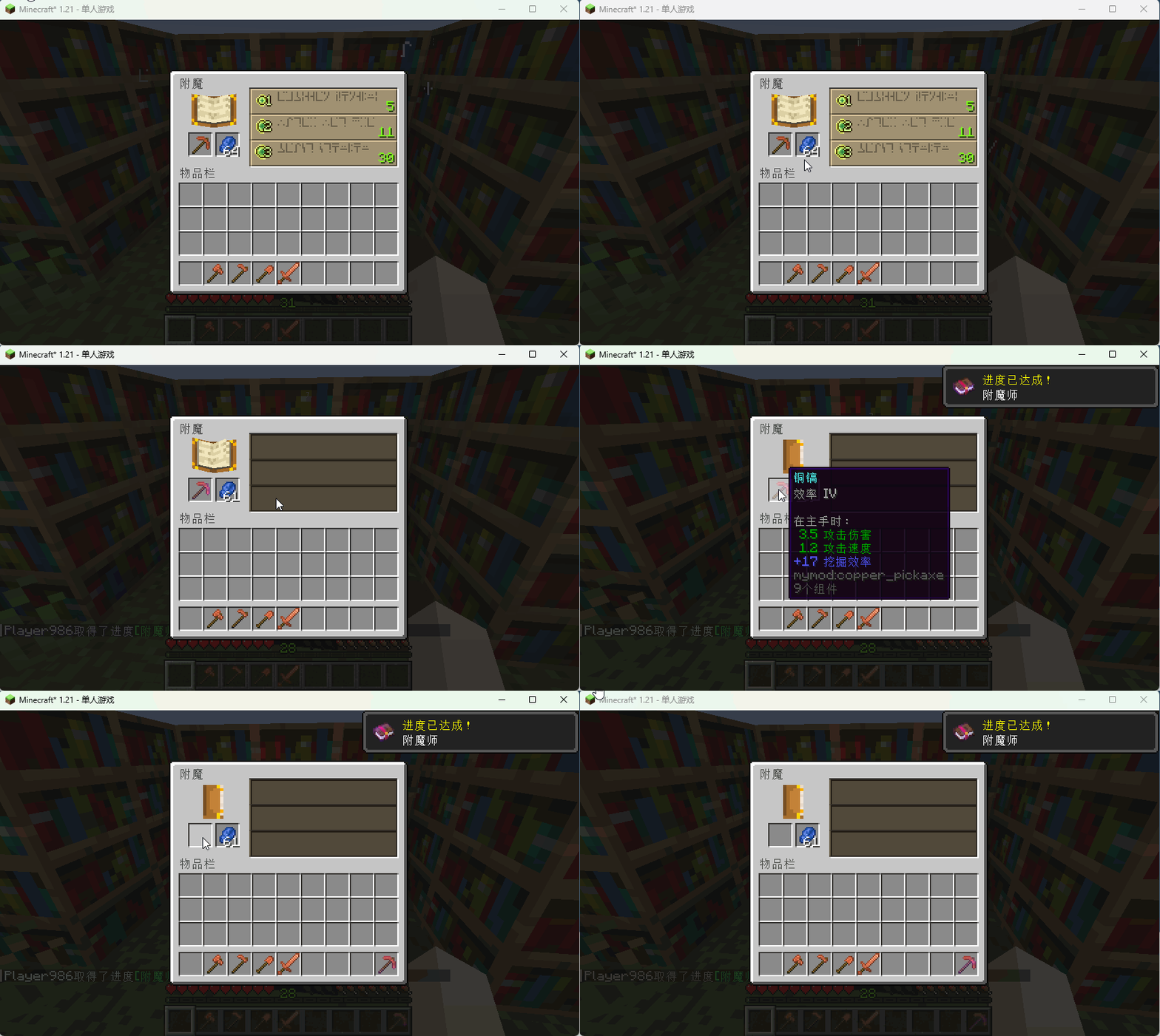
当这些自定义工具,放置到附魔台上时,发现无法进行附魔。查阅了一些资料发现,需要对这些工具打上附魔的tag标签。
同样在main\resources\data\minecraft\tags\item\enchantable文件夹下(文件夹不存在则新建),分别创建mining.json和sword.json文件。
// mining.json
{
  "replace": false,
  "values": [
    "mymod:copper_axe",
    "mymod:copper_hoe",
    "mymod:copper_pickaxe",
    "mymod:copper_shovel",
  ],
}
// sword.json
{
"replace": false,
"values": [
"mymod:copper_sword",
],
}此时,放到附魔台上就可以正常附魔了。
实现效果#

ATao
原创minecraft模组:02创建工具
本博客所有文章除特别声明外,均采用 CC BY-NC-SA 4.0 许可协议, 转载请注明出处。