WPF创建简单用户控件
基本概念#
用户控件(User Control)是一种可重用的UI组件,通过组合现有控件来创建自定义功能模块。它本质上是一个容器,可以包含其他控件并封装其交互逻辑。
主要特点#
- 继承自UserControl类.
- XAML+代码后置.
- 可重用的独立功能单元.
- 可自定义属性、方法和事件.
核心优势#
- 开发效率提升
- 维护性增强
- 功能解耦
示例#
假设需要封装一个FileSelectorBox控件,用来实现文件选择的功能。
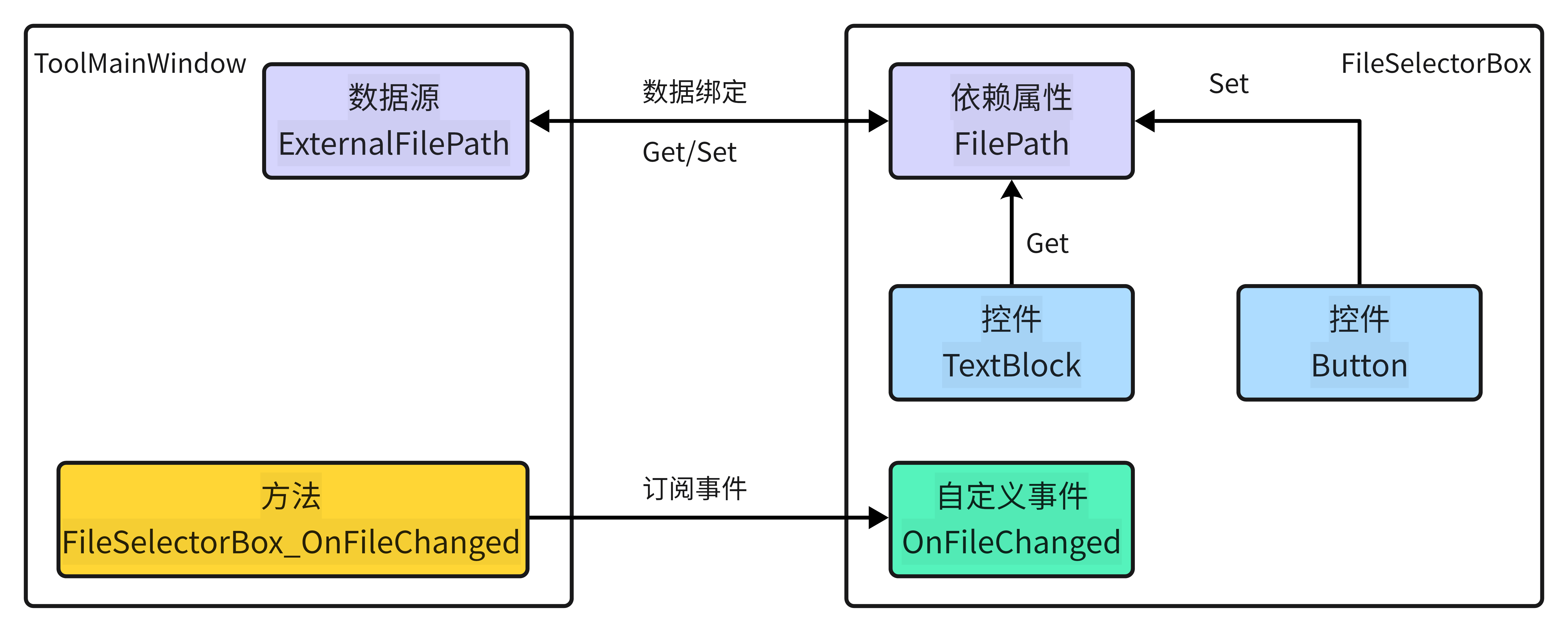
- 控件组成: 由一个TextBlock和一个Button组成。
- 依赖属性: FilePath(当前选择的文件路径)
- 自定义事件: OnFileChanged(当文件路径发生改变)
创建用户控件#
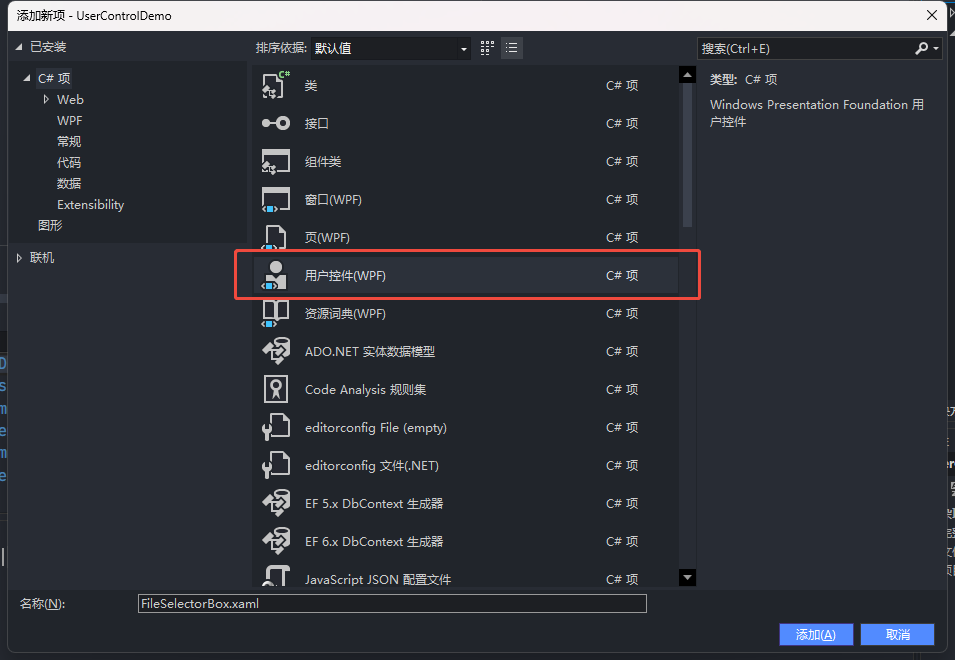
右键项目,选择添加,选择用户控件
组合现有控件#
<Grid>
    <Grid.ColumnDefinitions>
        <ColumnDefinition Width="*"/>
        <ColumnDefinition Width="Auto"/>
    </Grid.ColumnDefinitions>
    <TextBlock Grid.Column="0"/>
    <Button Grid.Column="1" Content="选择" Width="71"/>
</Grid>添加依赖属性和自定义事件#
public event EventHandler OnFileChanged;

public static readonly DependencyProperty FilePathProperty =
DependencyProperty.Register(
    "FilePath",     // 属性名称
    typeof(string),   // 属性类型
    typeof(FileSelectorBox), // 所属类型
    new PropertyMetadata(null, OnValuesChanged)); // 默认值,添加回调方法

public string FilePath
{
    get { return (string)GetValue(FilePathProperty); }
    set { SetValue(FilePathProperty, value); OnFileChanged?.Invoke(this, EventArgs.Empty); }
}

private static void OnValuesChanged(DependencyObject d, DependencyPropertyChangedEventArgs e)
{
    // 回调方法
    // 外部修改依赖属性的值时,将在这里回调...
}
当FilePath被修改时,需要修改TextBlock的内容
<TextBlock Grid.Column="0" Text="{Binding FilePath,
RelativeSource={RelativeSource AncestorType=UserControl}}" />按钮功能#
当按钮点击时,需要弹出一个文件选择框来选择文件
<Button Grid.Column="1" Content="选择" Width="71" Click="Button_Click" />private void Button_Click(object sender, RoutedEventArgs e)
{
Button button = (Button)sender;
switch(button.Content)
{
case "选择":
OpenFileDialog openFileDialog = new()
{
Title = "选择文件",
Filter = "All File|*.*"
};
openFileDialog.ShowDialog();
FilePath = openFileDialog.FileName;
break;
}
}控件使用#
<Grid>
    <local:FileSelectorBox  FilePath="{Binding ExternalFilePath, Mode=TwoWay}" OnFileChanged="FileSelectorBox_OnFileChanged"/>
</Grid>
public partial class ToolMainWindow : UserControl, INotifyPropertyChanged
{
private string _externalFilePath = string.Empty; // 数据源,也可以是自定义的数据模型
public string ExternalFilePath
{
get { return _externalFilePath; }
set { _externalFilePath = value; OnPropertyChanged(nameof(ExternalFilePath)); } // 通知属性值已更改
}
public ToolMainWindow()
{
InitializeComponent();
DataContext = this; // 设置数据上下文
}
public event PropertyChangedEventHandler? PropertyChanged; // 实现接口
protected virtual void OnPropertyChanged(string propertyName)
{
PropertyChanged?.Invoke(this, new PropertyChangedEventArgs(propertyName));
}
private void FileSelectorBox_OnFileChanged(object sender, EventArgs e)
{
Growl.Info($"ExternalFilePath发生变化:{ExternalFilePath}");
}
}
资源下载#
C

ATao
原创WPF创建简单用户控件
分享
本博客所有文章除特别声明外,均采用 CC BY-NC-SA 4.0 许可协议, 转载请注明出处。